

Làm thế nào sử dụng Trellis Microsoft SOTA Asset Generation Workflow One Click ComfyUI
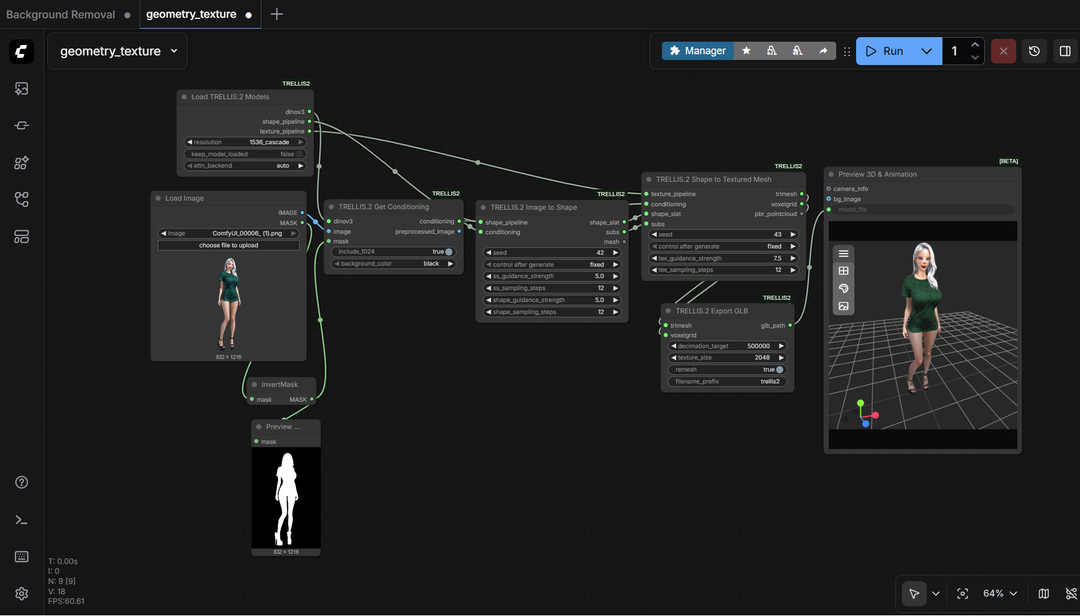
Trellis 2 - Microsoft SOTA 3D Asset Generation Workflow - One Click ComfyUI bộ cài Windows
Sinh high-resolution 3D mesh assets directly inside ComfyUI với mã nguồn mở Microsoft Trellis 2 3D model!
Điểm chính
- GPU: Nvidia RTX 30XX, 40XX, hoặc 50XX series (FP16 support required; GTX/20XX not đã test)
- VRAM: Minimum 16 GB, ideally 24 GB+ cho stable performance
- OS: Windows 10 hoặc 11
- File workflow, bộ cài và video hướng dẫn nằm trong phần thành viên.
Nguồn: congcu.ai
Comments
Join the discussionNo comments yet. Be the first to comment.
Tutorial
Nơi đây chia sẻ các tutorial, mẹo hay và thủ thuật công nghệ, giúp bạn khám phá công cụ mới và làm việc hiệu quả hơn.